How to Structure an AI Image Editor Website for SEO
Give each editing task a useful tool and output. Google says Merchant Center will require at least 500 × 500 pixels for all products beginning January 31, 2027. An export page can show that requirement.
Someone searching for a white background for product photos has a file to upload and a job to finish. A well-designed landing page gives them a way to start editing, check the result, and export it. Other searches, such as how to sharpen a blurry photo, are better served by a guide that explains what is possible before the user tries a tool.
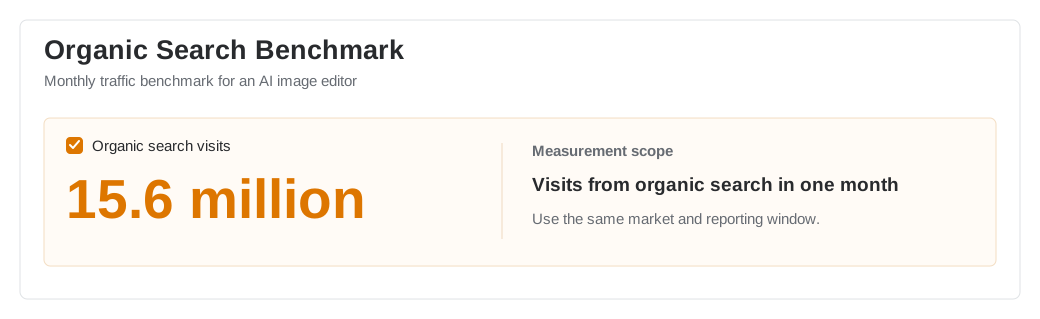
The 15.6 million visits in the chart below are an example planning benchmark. Use the same period and data source when you compare the benchmark with traffic observed on your site.
The product and the search problem
An online AI image editor for independent creators and small ecommerce teams may support a range of separate search tasks. It removes backgrounds, improves image quality, crops assets to fit publishing channels, and makes simple edits from a reference image. Its tool pages and guides compete in search with design suites, single-purpose tools, and template libraries.
The main architecture question is which page should help each user. A tool page can handle uploads and exports. A use-case page can explain marketplace requirements and show a finished product photo. A tutorial can explain how to make a choice before editing. Planning these separately helps users land closer to the task they need to complete.
Map search intent to the right pages
For the listing resize task, use a checked, dated output specification. The Merchant Center image-size guide documents a 100 × 100 minimum for non-clothing and 250 × 250 for clothing before the change. Its 500 × 500 requirement applies across categories from January 31, 2027. Show a preview and the actual exported dimensions so a reader can verify both.
The keyword research guide shows how to group queries that ask for the same editing task.
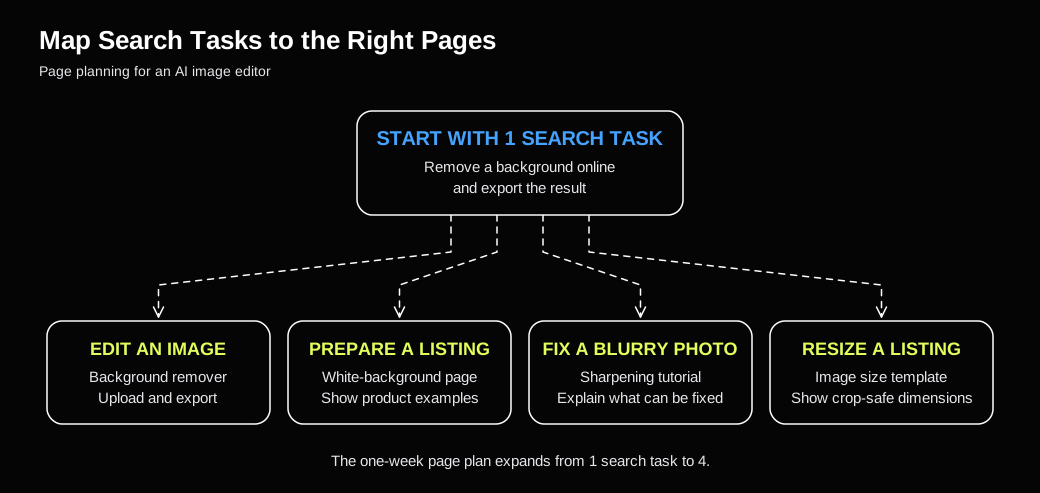
Start with the entry pages you already have. A background remover covers one task. White product backgrounds, sharpening blurry images, and resizing photos for a listing need different examples or output settings. Review the search results and walk through each task in the product before deciding which pages to build. Treat the map as a page plan until those pages are live and indexed.
| Search task | Preferred page | What the page should show |
|---|---|---|
remove background online |
Tool page | Upload, edge preview, and transparent export |
white background for product photos |
Use-case page | White-background examples, image specs, and an edge check |
how to sharpen a blurry photo |
Tutorial | Examples of what can be repaired and the order of edits |
resize image for product listing |
Size template | Required ratio, crop-safe area, and export quality |
Four ways to make the architecture work
1. Build each landing page around the task
A background remover should let visitors upload, preview, and export. A white-background product photo page should explain platform requirements, edge treatment, and batch limits. A tutorial on PNG and JPG should explain when to use each format, then lead readers to the relevant tool.
On a tool page, show supported file types and the expected output near the editor. Add before-and-after examples and troubleshooting below. Write alt text that describes what each example shows, and keep the main instructions in readable text. Google's image SEO guidance
2. Decide what should appear in the index
Use the canonical troubleshooting guide when similar presets or export paths compete for the same purpose.
An editor can generate URLs for crop dimensions, session IDs, and saved states. Separate public landing pages from duplicate URLs and private or temporary workspaces. Align canonical tags, sitemap entries, and internal links for public pages that have near-identical variants. For separate language versions, check whether the words, examples, and output requirements fit the local market. Google's guidance on canonical URLs
Sample tools, tutorials, and templates when auditing the site. For each page, record the response code, index status, the visibility of its main content, and which URL actually receives search traffic. Start with established tasks where Google is showing the wrong page.
3. Add a page when the user needs something different
If two queries lead to the same task and output, improve the preferred page with the relevant examples and wording. A separate page makes sense when the user needs a different editor flow, format, or type of proof. A listing resize page, for example, earns its place by showing the required dimensions, crop boundaries, and export settings for that listing.
Build tutorial topics from recurring product questions. Pair a guide on preserving transparent edges with the background remover, and connect a guide on visual artifacts to the sharpening tool. These links give readers a next step that matches the article they just read.
4. Distribute assets that others can use
A design publication or ecommerce community may have a reason to share a product image specification table or a set of before-and-after examples with clear usage rights. Publish the material at a stable URL with its update date and scope. Report referral visits, branded search clicks, and tool use separately so a single placement does not get credit for every change in traffic.
How to read a monthly organic traffic snapshot
At a planning scale of 15.6 million monthly organic search visits, break down the benchmark by tool pages, tutorials, and templates before deciding what to expand. For comparisons, check the month, countries, devices, site boundaries, and data source. Search Console clicks, analytics sessions, and third-party visit estimates use different definitions and can differ substantially.
To assess an optimization, group pages by launch date and compare them with pages that have similar intent and prior performance. Keep a record of seasonality, feature launches, and indexing changes. After someone lands on a page, measure uploads, successful processing, exports, and paid upgrades separately. Those steps help you distinguish a page that gets search traffic from one that helps users finish the task.
Audit one image editing task end to end
Choose a frequent task and follow it from the search result to an exported file. Check that the landing page opens the right tool, the example matches the expected output, editing parameters do not create unnecessary public URLs, and the key steps are tracked. The audit will show whether to fix the existing entry point, write a guide, or build a new tool page.