How We Would Help an AI Document Assistant Target 2.61M Organic Clicks in 13 Months
Omnius reports 2.73M organic clicks over 13 months for a separate SaaS project. The 2.61M figure in this guide is a planning target for an AI document assistant, with indexing and product pages first.
This plan walks through SEO for an AI document assistant, from fixing indexing and building product pages to publishing meeting-notes content and expanding into new languages.
The click, ranking and traffic-value figures in this guide are planning targets. Omnius’s published SEO case describes a separate engagement.
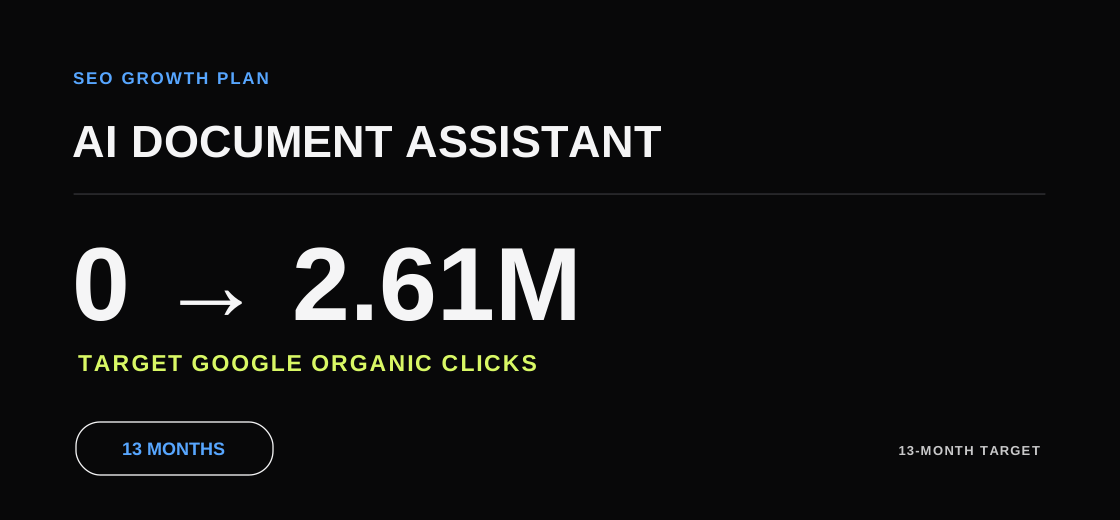
Growth Targets at a Glance
The Omnius project write-up also reports more than 20,000 daily organic clicks by the end of the engagement. Keep that observed project figure separate from this guide’s modeled 19,000 daily clicks in the final month. Record daily run rate and cumulative clicks as different measures.
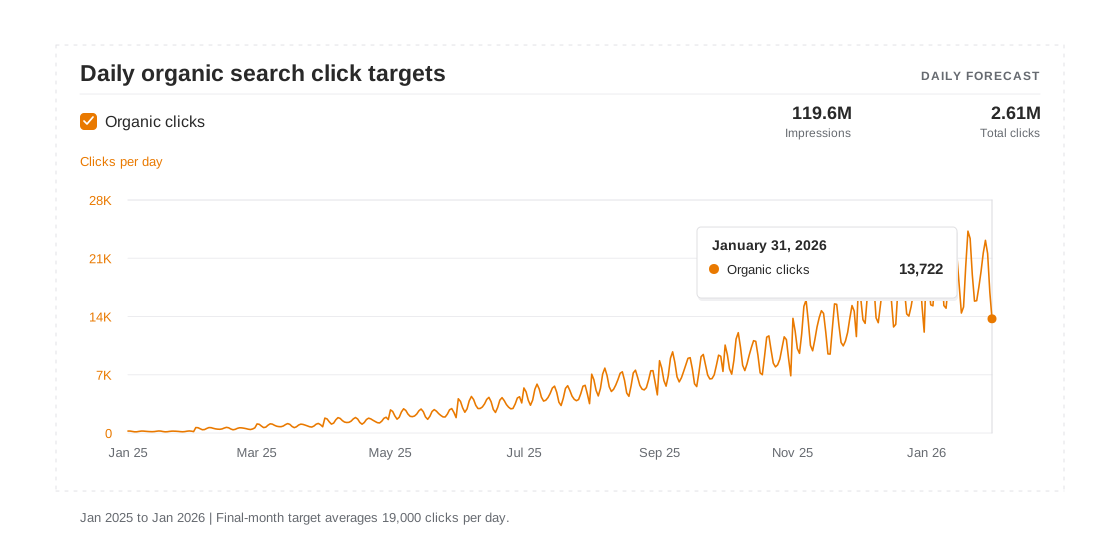
The forecast spans January 2025 through January 2026 and starts from zero pre-launch search clicks. Use these figures as planning targets to review against observed search data.
- 2.61 million cumulative Google organic search clicks targeted.
- 19,000 average daily organic clicks in the final month, based on 589,000 clicks over 31 days.
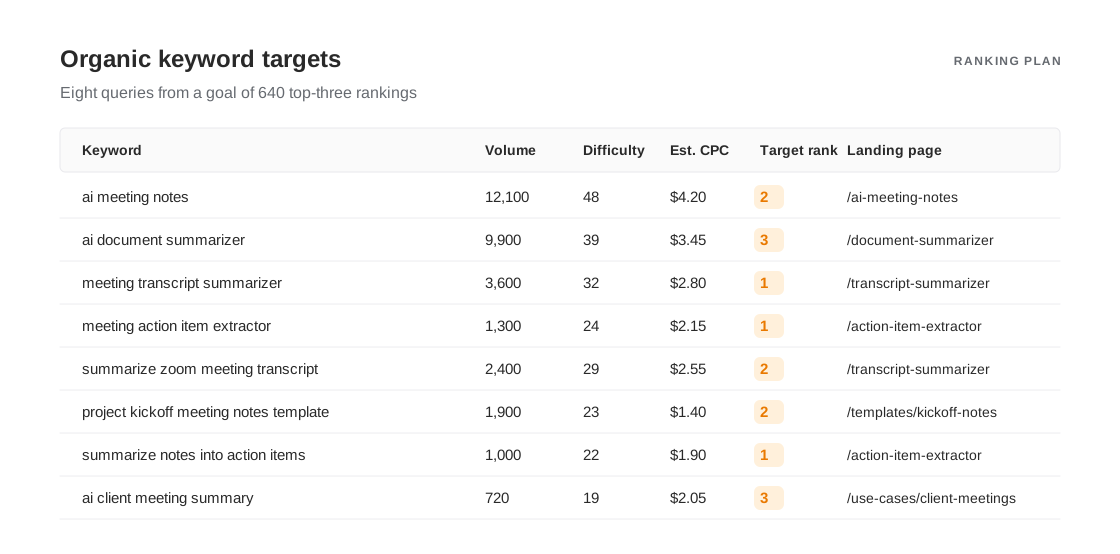
- 640 tracked queries targeted for the top three at the end of the plan.
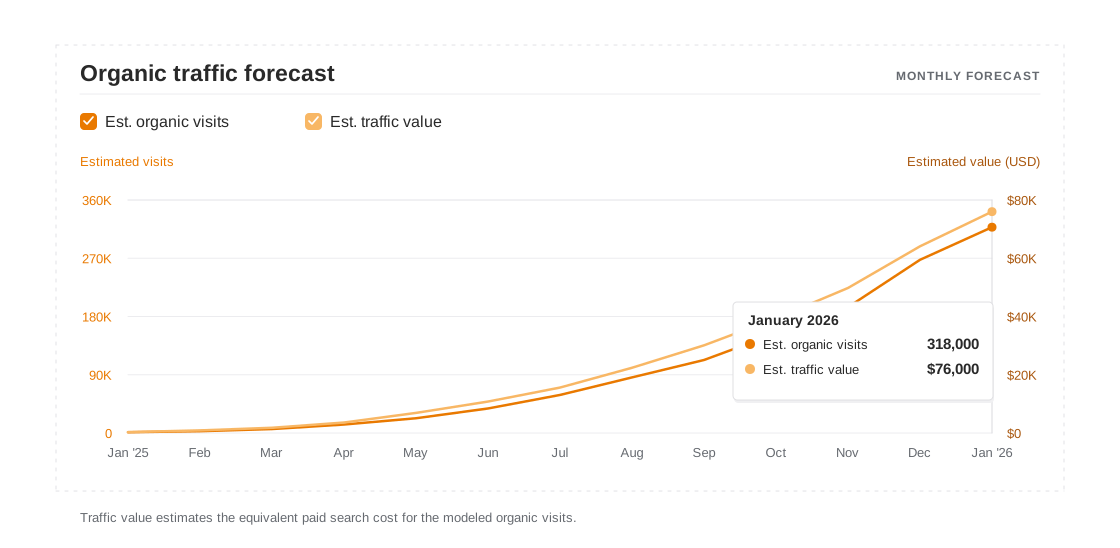
- $76,000 in estimated monthly organic traffic value at the end of the campaign, up from a zero baseline.
The Product and Its Buyers
The AI document assistant turns recordings, transcripts, and documents into meeting notes, summaries, and action items. In English-speaking markets, established tools already cover much of the broad search demand.
Individual users want to get through their own meetings faster. Team buyers also care about permissions, export formats, and handoffs. Map the searches each group would make and the questions they need answered before trying a tool.
Pair those searches with relevant product pages. Give self-serve trials and team demos separate conversion paths so you can review each page type against its purpose. Getting started with Google Search Console
The Challenge
If existing pages are discoverable but remain absent from the index, use the crawled-but-not-indexed checklist before adding more URLs.
A new site often starts with a homepage, a few product descriptions, and a handful of articles. Visitors can understand what the product does but may struggle to find a page for the task they want to complete.
Look for four problems in the first audit.
- Broad terms are competitive. General AI document searches brought up large platforms, directories, and review sites. Searches for specific tasks gave the product a clearer opening.
- Several URLs may point to the same feature. Navigation, article links, and query parameters can send crawlers toward competing versions of some pages.
- Some pages may answer the wrong question. Searchers looking for a meeting-notes example may land on a definition. Buyers comparing tools may struggle to find a concrete comparison or trial.
- Content may lack topic ownership. Articles scheduled by publication date alone can lack a shared map of target queries and related product pages.
Give engineering, content, and product one plan. Start by checking whether search engines can discover and crawl the priority landing pages. How Google Search works
The acquisition goal started with the task a visitor wanted to complete. Someone who arrived from search needed a credible input and output example, plus a clear choice between trying the tool and asking for a demo.
Set two goals for the campaign.
Give each high-intent task a clear, indexable landing page.
Track trials, demo requests, and first successful use separately for product pages and editorial pages.
Test the approach first on meeting notes and document summaries. Use the same small set of URLs for engineering fixes, product examples, and analytics events so the changes are easy to review together.
Once those pages are stable, reuse the approach for transcript summaries, action items, and other languages. Start each expansion with a page format your team understands.
Our Approach
The plan covers four areas. The first three make pages easier to find, more useful to searchers, and easier to act on. The fourth covers repeating the work across more pages.
Fix crawling and indexing issues and give each core task a permanent URL.
Build content clusters that cover the questions people ask as they move from learning a workflow to choosing a tool.
Update existing articles and product pages to shorten the path from reading to trying the product.
Expand publishing once product review and language QA are in place. Google's guide to helpful content
1. Fix Site Architecture and Map Product Pages
Start with a shared inventory of existing and planned URLs. Record the target query, the job the page serves, its indexing status, and the team responsible for it.
- Research long-tail queries. Start with support tickets, interviews, and existing search queries. Then examine the results page to see what kind of page searchers expect. Google Keyword Planner guide
- Resolve duplicate URLs. Choose a preferred URL for each group of parameter pages or duplicate templates. Make the sitemap and internal links point to the same address. Google's guide to canonical URLs
- Show the product in use. Add input requirements, a short workflow, and an output readers can inspect. Use those examples to decide what supporting articles are worth writing.
The homepage, meeting-notes feature page, and a template article may all target versions of AI meeting notes. Assign them different jobs. The homepage introduces the product, the feature page offers a trial, and the template article delivers a downloadable example.
Trace links in the navigation, related articles, and page copy. Check whether a reader can go directly from an article to the tool they actually need. Google's crawlable links guide
Group pages around three types of intent. A visitor might be learning a concept, following a workflow, or comparing tools and getting ready to try one. Give each page a primary purpose and a clear next step.
Build the pages closest to product use first. Someone with a transcript could immediately try the action-item extractor. Someone with a long report could try the document summarizer.
Before publishing, settle the navigation and URL conventions so that new topics have a predictable home.
Build the first set of pages in two steps.
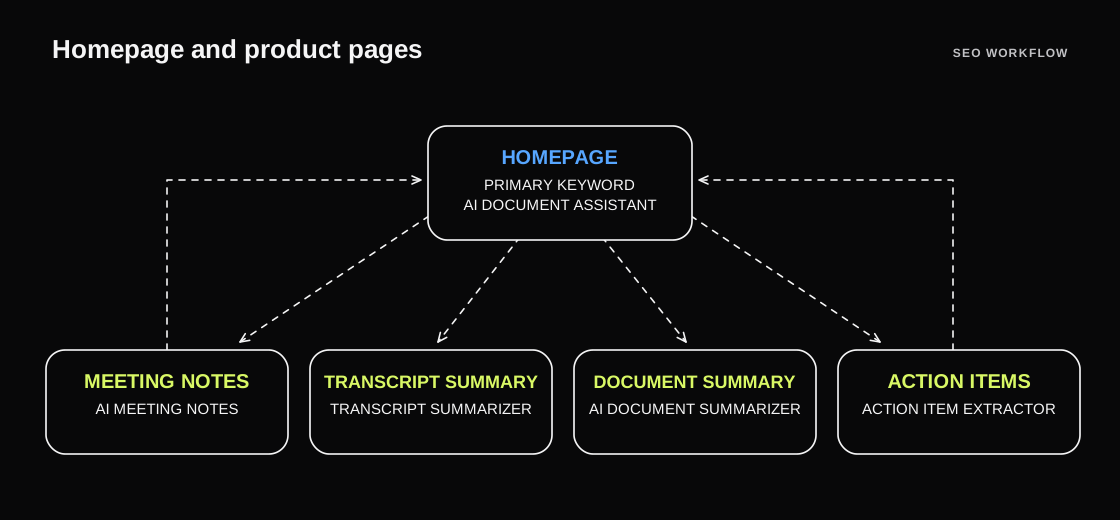
Step 1. Use the homepage for broad demand for an AI document assistant. Give meeting notes, transcript summaries, document summaries, and action items a stable URL and a primary query each.
Step 2. Give high-intent pages their own format. Open with the task and a sample input and output, then cover format support, limitations, and how to try the feature. Use descriptive titles to separate tools, use cases, and comparisons. Google's guide to title links
Test two page templates in the first release.
- Alternative page. Explain what to check when replacing manual notes with automated notes, including accuracy, permissions, and export options.
- Role-specific use case. Show a project manager how to turn a handoff meeting into a task list with owners and due dates.
Once the main entry points are in place, cover the questions that come earlier in the search journey.
2. Build Content Clusters Around Real Document Tasks
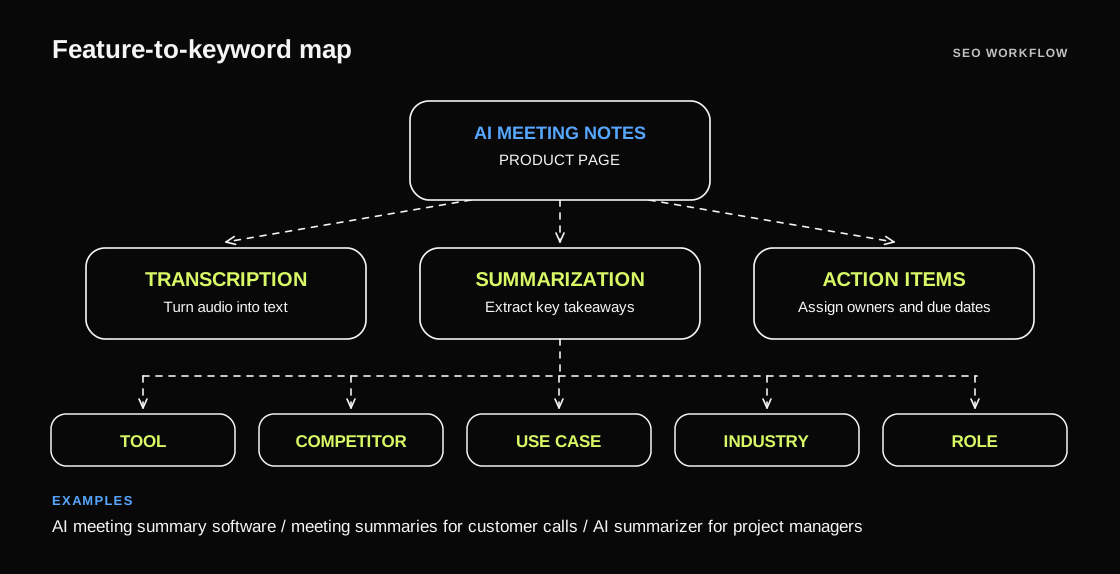
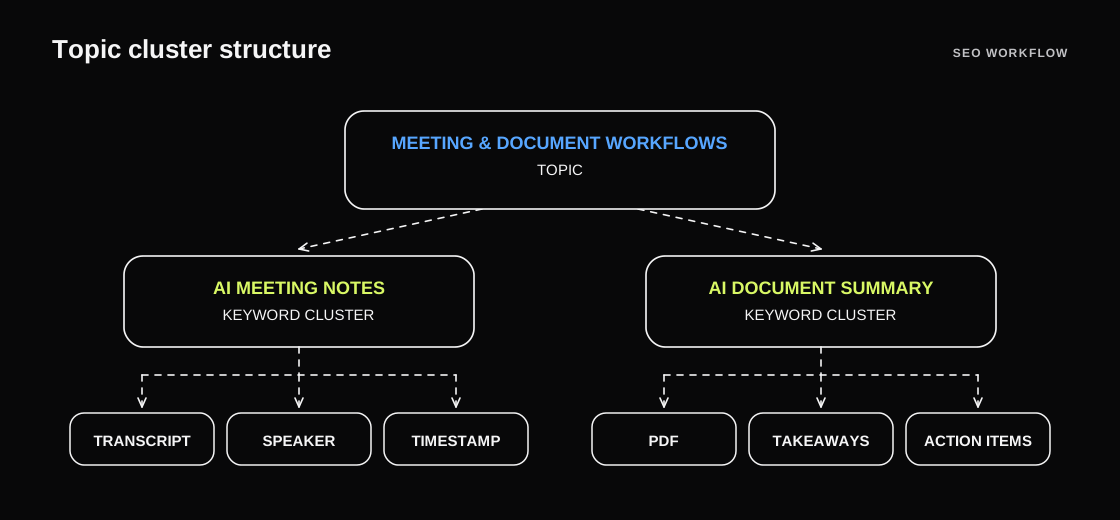
Choose topics where the product can produce a concrete output. For meeting notes, that means transcripts, speakers, and timestamps. For document summaries, it means PDFs, key takeaways, and action items.
A topic could support tutorials, templates, and tool pages. Before writing, specify the question a new page will answer and check it against the existing content inventory.
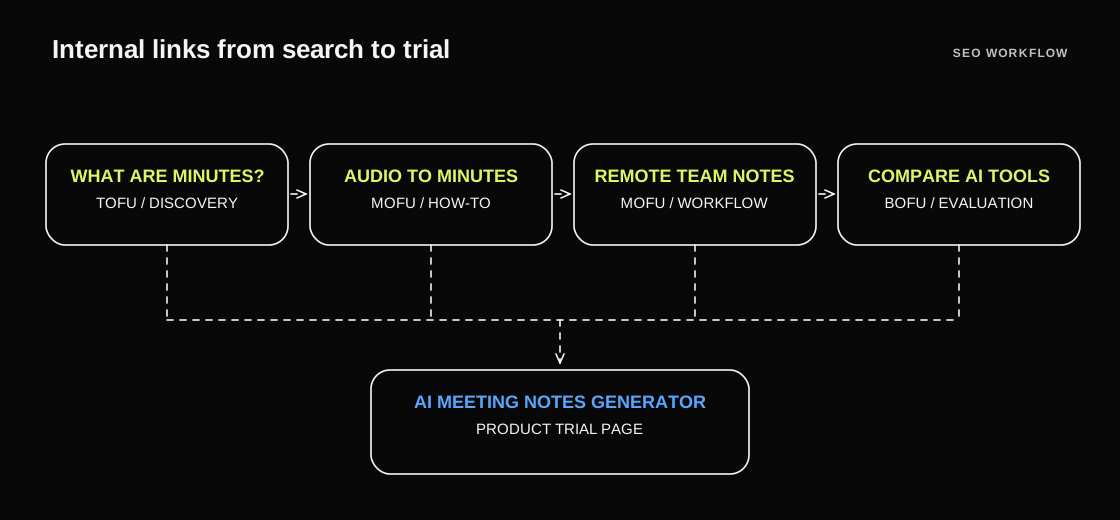
The first batch can cover seven search intents.
- Bottom of funnel. AI meeting notes tool review.
- Bottom of funnel. Manual vs. AI meeting notes.
- Middle of funnel. Alternatives to manual meeting notes.
- Middle of funnel. How to turn a meeting transcript into action items.
- Middle of funnel. Remote team meeting documentation best practices.
- Middle of funnel. How to hand off meeting decisions across teams.
- Top of funnel. What are meeting minutes?
Build internal links around the reader's next question. Link a definition to a tutorial, a tutorial to a relevant comparison or tool, and the tool page back to format and permissions guidance.
Update older tutorials too. Open a transcript tutorial with the quickest working method, followed by a complete example and guidance for transcripts with several speakers or missing timestamps.
Descriptive link text tells readers what they will get after clicking and helps editors spot pages with overlapping purposes.
Report impressions, search clicks, clicks into the tool, and successful first use by topic. This makes it easier to tell which topics attract readers and which bring users into the product.
Prioritize topics customers ask about, the product can handle, and the site has yet to explain. Each new URL should fit the existing map.
3. Improve Existing Pages and the Trial Path
As organic clicks grow, check where readers stop. An article, a feature page, and a comparison serve different purposes, so assess conversion by page type.
Audit existing content against search queries, entry pages, clicks, engagement, and first use. Put each page into one of two groups.
- Merge or retire. Identify a useful replacement for duplicate content, redirect where appropriate, and update internal links.
- Keep and update. Add a real task example, product limitations, and a clear next step to pages that meet a distinct need.
Use the same URL inventory for the audit and editorial calendar. Check the topics a page already covers before commissioning more content.
Track trial starts, demo requests, uploads, and successful outputs on product and comparison pages. Keep the entry page and device type in each report.
Use-case pages should show the inputs each audience works with and the output it expects.
- Show project managers how to extract owners and deadlines from a transcript with multiple speakers.
- Show customer success teams how to turn call notes into a follow-up summary they can send to a customer.
These examples help readers judge the output before trying the feature. For sensitive workflows, provide sample files so people can inspect the process before uploading their own material.
Focus next on high-traffic pages where few visitors reach the product.
Change one major element at a time. For example, a generic Sign up button could become Generate notes from a sample. Measure successful first use, with button clicks as a secondary signal.
Use four steps to choose and review tests.
- Calculate trial start rates separately for feature pages and articles.
- Identify pages below the baseline for their group and record their main queries and device mix.
- Start with higher-traffic pages and log the hypothesis and release date.
- Recheck first use over a comparable period and record other changes that may have affected the result.
Use the funnel to guide the next round of work. Record search metrics and product conversion events separately.
4. Scale Publishing and Localize the Strongest Pages
Once the core pages are stable, focus the editorial calendar on features your team can reliably demonstrate. Meeting-notes examples can cover common meeting types, and summary examples can cover reports, interviews, and handoffs.
Have a product owner review each brief against the feature's scope. Include a sample input, expected output, manual review steps, and the relevant product URL.
Review new search queries, support requests, and feature updates every week. Update existing pages first and create new URLs when searchers need a distinct answer.
Schedule releases around the number of examples your team can verify. Keep drafts in the queue until their examples are ready.
After the English pages have a stable structure, pick pilot topics for other markets.
Start German, Spanish, and French with one group of tasks each. Adapt query wording, sample files, and calls to action for local readers. Use separate paths and check that alternate versions point to each other. Google's guide to localized page versions
Monitor indexing, organic clicks, and first use separately by language. Use the data to decide which features to localize next.
Monthly Targets and Measurement
The daily and monthly forecasts use the same date range. Review impressions and clicks together, and treat the ranking table as a set of targets for the final month.
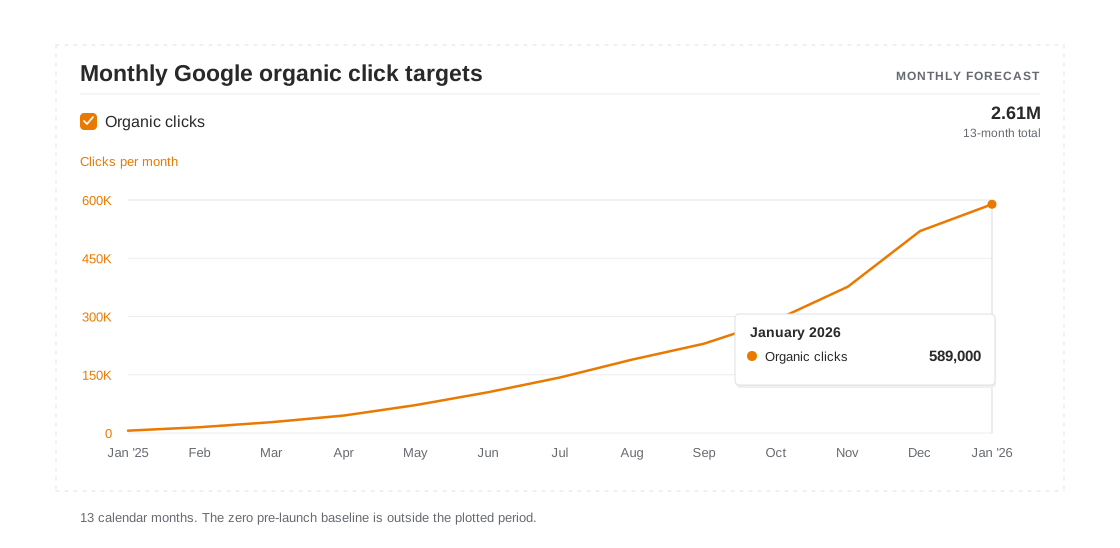
The plan calls for monthly clicks to rise from 6,000 in January 2025 to 589,000 in January 2026. The zero baseline is the starting assumption before public launch and sits outside the 13-month window.
13-month target. 2.61 million cumulative Google organic search clicks.
The final-month target is 640 tracked queries in the top three. The table shows eight keyword targets, with their landing pages, estimated search volumes, and target positions.
The final-month forecast puts organic traffic value at $76,000, based on expected visits and the estimated cost of buying comparable clicks. The chart shows visits and traffic value on separate axes.
Use rankings to understand visibility, clicks to understand traffic from the results page, and product events to see whether visitors complete a task. Each one answers a different question about a topic or page.
For a live project, export query and page data for a fixed period. Save the filters and date range, and add major site changes to the reporting timeline. Search Console performance report
Plan Your First AI SaaS SEO Audit
The SEO audit scope explains how to turn these checks into prioritized fixes and acceptance criteria.
If you could improve only a handful of pages, which task would you want more users to discover through search?
Open Search Console and export 90 days of query and page data. Pick three groups of queries with impressions and a clear product fit, then check each group's entry page, index status, and path to first successful use.