A 12-Month SEO Plan Targeting $7.65M in Qualified Pipeline for Data Security SaaS
Tie organic visits to CRM-qualified opportunities. Powered by Search reports over $7.9M in 12-month Cyera pipeline. The $7.65M below is a planning target.
A homepage can explain what a data security platform does. Buyers investigating a particular exposure often need more detail before they can evaluate a product. Start by finding out where buyers enter from search, build pages around the problems they bring, and agree with sales on how to record qualified opportunities.
The $7.65 million figure is a planning target based on 52 assumed sales-qualified opportunities. The starting figures below are scenario inputs. Use the Google Analytics landing page report for actual landing-session data and your CRM for qualified pipeline.
Check where buyers land
Powered by Search’s Cyera PDF reports annual new organic users increasing from 35,509 to 56,365. It describes a separate client engagement. This guide models 34,800 and 54,900 in comparable planning windows, so keep those two pairs in distinct records when using the example.
Export organic search landing sessions and group the destinations by homepage, solution page, glossary, and other content. Review branded and non-branded queries separately where the data allows. If most visits go to the homepage, check which buying questions lack a corresponding page.
Ask sales and solutions engineers which questions buyers raise before a demo. A data security team may need to find sensitive data in cloud storage, identify excessive permissions, or verify that remediation worked. Prioritize recurring questions your product can address. Check for an existing page before planning a new one.
Give each buying problem a path through the site
The B2B SEO guide explains how to map discovery and evaluation pages to decisions in a longer buying cycle.
Create a solution page for the problem
Start with the environment and the buyer's goal. Explain the workflow, how to verify the result, and what limitations apply. For a page about excessive access, you could show which permissions the product inspects and how a security team reviews exceptions. Link from the homepage or product navigation so readers can find the page without knowing the precise term.
Cover the follow-up questions that matter to an evaluation
Add supporting content around the questions the solution page raises. For excessive access, useful follow-ups might cover which permission changes qualify as risky, how to prioritize remediation, and what evidence an auditor may need. Give each page a primary question and a next step, such as an implementation guide or a demo for a particular environment.
Make technical claims verifiable
Put definitions and requirements in the page text. Name the objects a procedure applies to, and describe actions in the order a reader would take them. Ask an engineer to check claims about permissions, deployment, and sample data. Record when the review happened so the team knows when to revisit the page.
Connect glossary pages to a task
A glossary entry on data security posture management can define the term and show a cloud storage bucket with excessive access. Link from that example to an investigation guide for readers diagnosing a problem and to a solution page for readers evaluating software.
Define qualified pipeline with sales operations
See the SEO ROI calculation guide when you connect opportunity value to separately recorded closed revenue and costs.
Choose a stable rule for including an opportunity. A first-touch report can require organic search as the first identifiable marketing touch, an initial sales qualification date within the reporting window, and an estimated contract amount recorded at qualification.
| Field | What to record |
|---|---|
| Opportunity ID | The stable identifier used to deduplicate records |
| First identifiable touch | The earliest marketing interaction recorded for the contact or account, with its channel |
| First qualification date | When sales first accepted the opportunity under agreed criteria |
| Value at qualification | The estimated amount recorded at that stage, in the reporting currency |
Group qualifying opportunities by qualification date and add their values. Track closed revenue separately. Review records with missing sources or values and report what the dataset covers. A first-touch rule describes an observed path, and other interactions such as events and sales outreach may also contribute.
Turn the 12-month pipeline goal into quarterly targets
If the homepage starts at 77% of organic search landing sessions and the target is 41% by the final quarter, plan to shift 36 percentage points of the entrance share beyond the homepage. Track new organic search users separately. A target of 54,900 in the next 12 months against 34,800 in the prior 12 months implies about 58% growth. Use the same site and channel definitions for both periods.
Set quarterly targets for qualified opportunities and their value at first qualification. Start the cumulative amount at zero on the first day of the reporting window. A $7.65 million annual pipeline goal can be broken down into 52 opportunities.
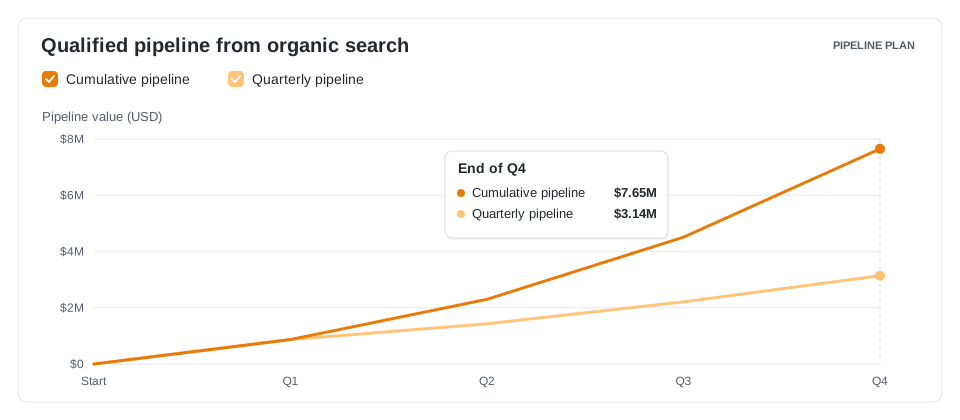
| Qualification quarter | Qualified opportunity target | Value target at qualification |
|---|---|---|
| Q1 | 6 | $870,000 |
| Q2 | 10 | $1,430,000 |
| Q3 | 15 | $2,210,000 |
| Q4 | 21 | $3,140,000 |
| Total | 52 | $7,650,000 |
Start with one buyer problem
Choose one problem from your sales notes. Map a solution page, an evaluation resource, and a glossary entry to it. Measure which pages gain organic entrances and where readers go next. When the sales team starts seeing opportunities connected to those visits, review the CRM records together and check that they meet the agreed qualification rules.