A Six-Month SEO Plan for Interior Design Software to Target 714 Monthly U.S. Organic Trials
Connect a design tutorial to a sample project in the trial. Skale reports 22× U.S. organic free-trial conversions in 6 months for Foyr. The 714 trials below are a worked target.
Map interior design search intent to product pages and tutorials, open trials in relevant sample projects, and measure which paths lead to completed signups.
The 714 monthly trials are a planning target derived from 23,800 assumed U.S. organic sessions and a 3% same-session trial rate. Use a Google Analytics funnel exploration to compare the model with your observed signup flow.
A designer searching for room layout ideas has a different job from one comparing tools for a client project. The first may need a reusable layout with dimensions. The second needs to check file types, export limits, and whether the software can produce a shareable result. Give each visitor a page that answers the current question and a next step that fits the task.
Start with the tasks designers need to complete
Group sales questions, support tickets, and organic queries by the work a designer is trying to do. Review the search results for each task to see whether they mostly offer tutorials, product pages, comparisons, or inspiration. Use that context to choose a page that can meet the intent and point to a sensible product action.
| Search intent | Example query | Best page | Next step |
|---|---|---|---|
| Draw a plan to scale | online floor plan software for designers | Floor plan product page | Open a scaled trial project |
| Test a room layout | how to plan furniture in a small living room | Small living room tutorial | Copy the example layout |
| Compare tools | 3D interior design tool vs. 2D floor planner | Workflow comparison | Check export and rendering options |
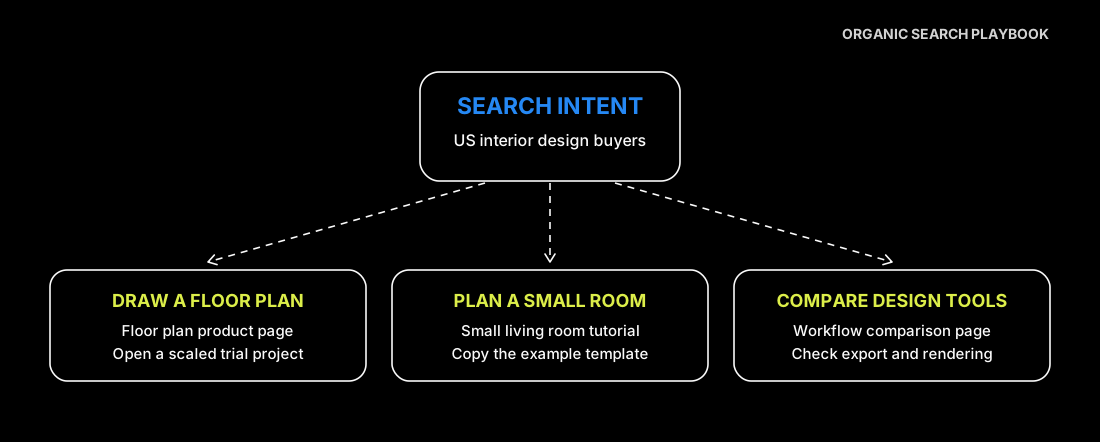
Prioritize tasks using likely impact, confidence, and production effort. Use real buyer questions and existing landing page activity to judge confidence. Check whether you already have sample files, screenshots, or templates to support the page. For a U.S. audience, confirm the terms and measurement units buyers expect and that the sample project opens with those settings.
Show what the software can produce
Use the canonical troubleshooting guide to verify the destination when you consolidate overlapping tutorial URLs.
Build each product page around a complete task. A floor plan page can show how to import a drawing or enter dimensions, place walls and openings, and export a shareable result. Put a sample output near the workflow. State supported units, file types, trial limits, and any exports that require a particular plan. A comparison page can use the same sample project to show how a 2D plan, a furnished model, and a render differ.
Review older tutorials for entrance intent, traffic, and the actions people take next. A popular layout guide can show a complete room with furniture measurements and offer a copy of the layout. Where several posts answer the same question, consolidate useful material on a primary page. Redirect a retired URL when it has an equivalent replacement, and update internal links to point to the replacement directly.
Open the trial in the project the visitor came to see
A visitor who clicks “Copy this layout” should land in a trial workspace with that layout loaded. Keep a clear path back to the original template, and explain if the visitor needs to create an account before editing. Test the flow from both the product page and tutorial, including mobile signup and a return to the project after account verification.
Give each entry point an identifier. Capture the landing page, template click, completed trial workspace, and first completed design action separately. Define an activation event that reflects actual use, such as editing a room and saving a project. Verify that refreshing a confirmation page does not count the same workspace twice.
Measure discovery, conversion, and activation separately
The product analytics SEO plan shows another way to separate trials or signups from subsequent product use.
| Metric | What to count | What it helps diagnose |
|---|---|---|
| Organic search sessions | Sessions from organic search in the market you are evaluating | Whether the intended audience is reaching the relevant pages |
| Same-session trial rate | Organic sessions with a completed trial divided by organic sessions | Whether the landing and signup experience leads to a trial |
| Trial activation rate | Trial workspaces that complete the chosen design action within the observation window divided by eligible workspaces | Whether visitors can do the job that brought them in |
Measure each rate with the same country, channel, and time filters. Group results by landing page type and by template entry point. If total trials rise, compare the distribution of visits across landing pages and the conversion rate on the same pages. A shift toward product pages can raise the sitewide rate even when conversion on individual pages stays steady.
If you need to test the trial entry point itself, change it on a small set of comparable pages or use a controlled test. Record changes to search visibility, promotions, and the signup flow during the test window. Evaluate completed trials and activation alongside button clicks.
Build a six-month trial growth plan
Skale’s separate Foyr case also reports a 15.5× increase in non-branded organic traffic over 12 months. For this guide’s model, holding the 23,800 sessions constant yields 595 trials at 2.5% and 833 at 3.5%. Use that sensitivity to decide whether acquisition or trial conversion needs attention before revising the 714 target.
Use the traffic and conversion rates together when you set a trial target. Suppose you begin with 1,700 monthly U.S. organic search sessions and 34 same-session trials, a 2.0% trial rate. A plan targeting 23,800 sessions at a 3.0% trial rate would yield 714 monthly trials. That means 14 times the traffic, a gain of 1 percentage point in conversion, and 21 times the trial volume.
Use the baseline month and six full planning months, with the same U.S. market and organic search filters throughout. Count a trial when a new trial workspace is created in the same session. Count at most one trial per session and deduplicate workspaces.
| Month | U.S. organic search sessions | Same-session trials |
|---|---|---|
| Baseline | 1,700 | 34 |
| Month 1 | 2,700 | 58 |
| Month 2 | 4,400 | 101 |
| Month 3 | 7,100 | 170 |
| Month 4 | 11,300 | 283 |
| Month 5 | 16,600 | 448 |
| Month 6 | 23,800 | 714 |
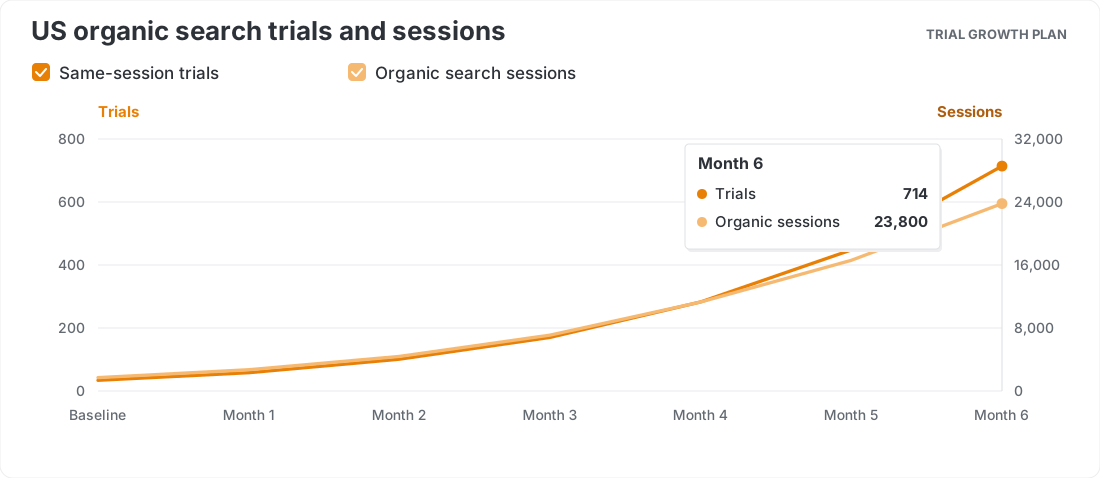
The planning math is 14 times the sessions multiplied by 1.5 times the trial rate, giving 21 times the trials. That helps you separate targets for discovery and conversion. Use the first two months for measurement and page planning, months three and four for publishing and consolidating tutorials, and the last two for mobile signup and template entry. Assign owners and review each checkpoint against actual performance before resetting the targets.
Start with one project
Choose a design task buyers already ask about. Build one product page, one useful tutorial, and one trial that opens to the same example. Check that each page answers a distinct question and that the three paths meet in the product. Review sessions, completed trials, and first projects before applying the approach to another task.