A 10-Month SEO Plan Targeting 87 AI Answer Citations for an Early-Stage Creative Tool
Build product and help pages for buyer questions, then measure a fixed set of prompts. SearchAxe’s HeyOz case is a published example. The 87-citation figure below is a target.
Turn a single-page AI tool site into a searchable product and documentation hub. Learn what to publish first and how to track rankings and AI citations.
The 87 citations are a planning target for a fixed set of AI prompts. SearchAxe’s HeyOz case study provides a separate published example.
A homepage can demonstrate that an ad creative tool exists. Buyers also need to find out whether it can turn a product image into a video, resize assets for multiple placements, or export a file they can use in a campaign. Build pages that answer those questions, publish outputs buyers can inspect, and track whether the right pages become easier to discover.
Establish the search baseline
List the pages people can access and the tasks those pages cover. Record which public URLs are indexed, which important pages have no links from the site, and where product specifications live. If there is only a homepage, start with the questions it cannot answer in enough detail.
Define one set of non-branded Google queries and one set of AI prompts tied to the same purchase intents. Record the region, language, and device for rankings, and the platform, mode, and collection window for AI answers. Save the baseline so later measurements can use the same conditions.
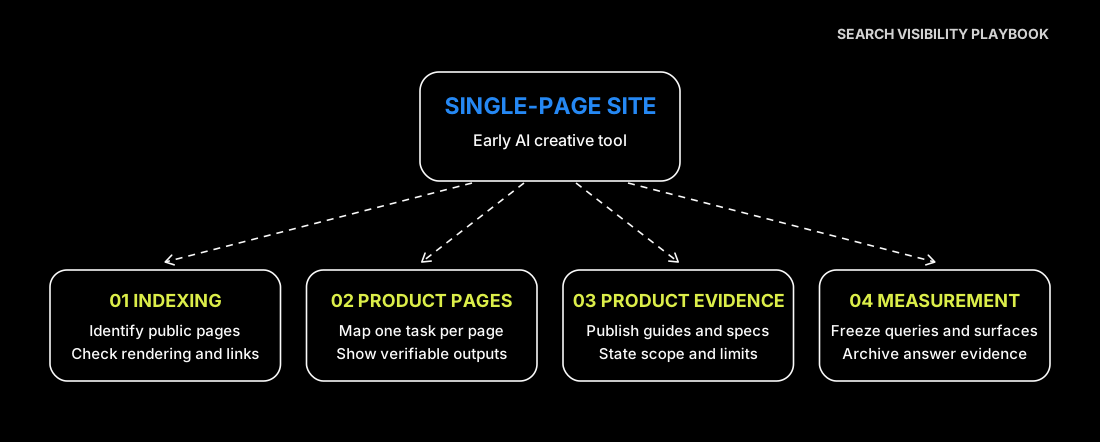
1. Make public product information discoverable
Use the SEO audit scope to organize crawl and indexing findings around specific URLs and checks.
Map which URLs should be public and which belong in the account area. Link from navigation or relevant documentation to the public product pages. Make sure important specifications appear in the rendered HTML, and check that sitemap and canonical URLs point to the intended pages. Keep drafts and private creative assets behind access controls.
Where structured data is appropriate, match it to the product details shown on the page. Google describes indexing and snippet eligibility as the foundation for appearing in its AI search features. Google Search documentation on AI features
2. Give each high-intent task a useful landing page
Build pages around distinct outputs. For an AI ad tool, the first topics might be making a short video from a product photo, resizing a batch of ads, and generating static creatives for an online store. Each page should identify its intended user, show a representative input and output, and explain limits that matter for a buying decision.
| Buyer task | Landing page | Product evidence |
|---|---|---|
| Create a video from a single image | Image-to-video product page | Input photo, exported video, supported length and format |
| Resize one ad for several placements | Batch resizing product page | Side-by-side exports and crop controls |
| Check export specifications before choosing a tool | Supported formats and sizes documentation | Current dimensions, file types, and plan limits |
A batch resizing page can show one asset at 1:1, 4:5, and 9:16 and explain where a user may need to move the crop around product text. Give each task one primary page and link to the relevant specifications and trial action. If two tasks need the same answer, share the documentation rather than maintaining competing versions.
3. Publish evidence buyers can check
Build a small set of supporting resources from actual product work. Useful material includes a sample project with reusable inputs, a setup guide with a known failure mode, or an export specification with limits and a review date. Keep product and documentation pages aligned when outputs, pricing, or permissions change.
Share those resources in communities or resource lists where they answer an existing question. Start with a useful asset and give the reader enough information to judge whether it solves their problem. Track where the resource is linked so you can distinguish a page people discover from one that needs a clearer route.
4. Track rankings, citations, and visits on their own terms
The AI visibility measurement guide provides fields for the prompt, answer, cited URL and observation window.
| Measurement | Suggested record | What it tells you |
|---|---|---|
| Google visibility | Query, tracked position, and ranking URL | Whether an intended product or documentation page is appearing for the task |
| AI citation rate | Answers linking to an owned URL divided by valid sampled answers | How often the monitored prompts return a link to the site |
| Citation coverage | Cited site URLs and AI platforms with at least one citation | Whether citations come from a single page or several sources |
| Organic search visits | Sessions grouped by landing page and source | Which search entrances produce actual visits |
For each AI prompt, run several independent sessions and archive the answer, citation URLs, and timestamp. Count an answer once when it includes one or more links to an owned page. Record how many answers were valid, including valid answers with no citation. A platform or prompt change affects comparability, so preserve the original cohort when adding new coverage.
When rankings improve, check whether the product page or an informational page ranks. When citations change, break them down by platform and URL before drawing conclusions. Treat search and AI metrics as visibility signals. Use site analytics to measure actual visits and signup behavior. To estimate the effect of a particular page change, track comparable unchanged pages or stagger releases and record other changes that occur at the same time.
Set up a 10-month measurement plan
Suppose a site starts with a single homepage, 58 referring domains, no monthly organic search sessions, and no top-10 positions or AI citations in the tracked sets. Keep those zero baselines in absolute terms. Track 100 non-branded Google queries. For each AI measurement, run 30 fixed prompts across seven surfaces in two independent rounds, for 420 responses if every run is valid. Keep the same region, language, and device settings on the Google side.
Use months one and two to make core pages discoverable, months three through five to publish high-intent pages, and months six through 10 to expand the product evidence and monitor coverage. The following checkpoints show how a team can record the two sets of measures side by side.
| Measurement | Google top 10 | Google top three | AI answers citing the site | Unique site URLs cited | AI surfaces citing the site |
|---|---|---|---|---|---|
| Baseline | 0 | 0 | 0 | 0 | 0 of 7 |
| Month 2 | 3 | 0 | 5 | 2 | 2 of 7 |
| Month 4 | 8 | 2 | 18 | 7 | 3 of 7 |
| Month 6 | 15 | 5 | 36 | 13 | 4 of 7 |
| Month 8 | 22 | 9 | 60 | 22 | 5 of 7 |
| Month 10 | 28 | 13 | 87 | 30 | 6 of 7 |
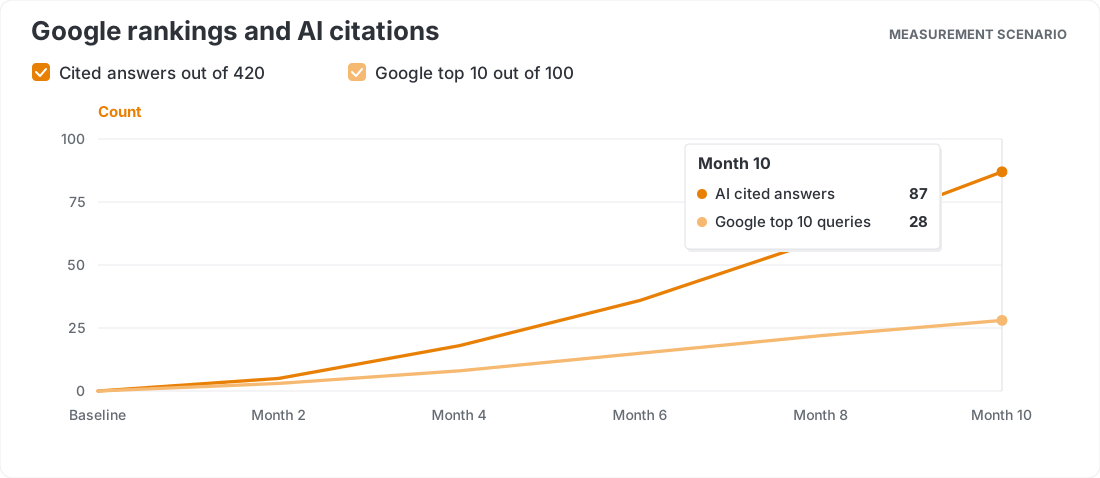
At the final checkpoint, 87 cited answers out of 420 responses gives a 20.7% citation rate. If the seven surfaces contribute 22, 19, 17, 13, 10, 6, and 0 cited answers out of 60 responses each, coverage is 6 of 7 surfaces. The 28 top-10 queries include 13 in the top three and 15 in positions four through 10. Keep the 30 unique site URLs cited as a separate coverage measure.
If referring domains rise from 58 to 624 and organic search sessions go from zero to 248 in the final month, put those figures in separate rows. Links, rankings, citations, and visits describe different parts of discovery. Compare them by page and time window without treating one as a direct estimate of another.
Start with the next buyer question
Choose a high-intent question that the homepage does not answer. Give it a dedicated page, a verifiable product example, and a relevant trial entry point. Record the existing search and AI measurements before launch, then rerun them on a consistent schedule to identify the next gap.