Website image performance and SEO. Keep specifications clear and pages fast.
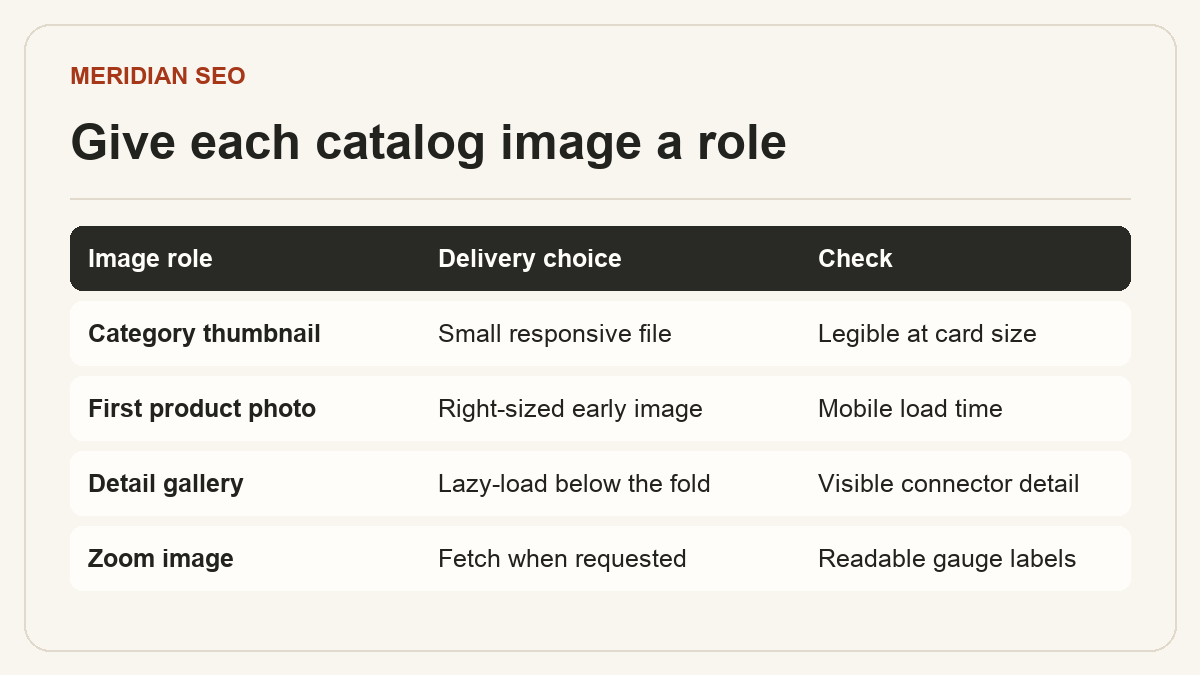
An industrial catalog needs photos sharp enough to identify a connector or read a gauge. Optimize them by display role. An illustrative pressure regulator page might serve a small category thumbnail, responsive product-gallery images and a separate zoom image for the inlet thread. Start with the files buyers see on mobile and check which assets affect the page experience.
01
Size images for the layout
Measure the rendered width at the common viewport sizes and create candidates for those slots. A gallery displayed at 360 CSS pixels on a phone could use a 720-pixel file at a pixel density of 2. Keep the full-resolution original behind the zoom control. Set image width and height attributes so the browser can reserve the right space before download.
Use responsive image candidates with accurate sizes
Keep a stable image URL and a crawlable img element
Check the chosen file in the browser network panel
Choose a format by visual detail and transfer size
Compare WebP or AVIF with the existing format using the same image and dimensions. Product photos can usually tolerate more compression than diagrams with small labels. Preserve a sharp original and check important edges, engravings and brand colors at the intended display size. File savings depend on the source image and encoder settings.
Set separate size targets for thumbnails and detail images
Compare candidates on a low-bandwidth mobile profile
Leave the main above-the-fold image out of lazy loading
03
Describe what the image adds
An informative image needs alt text based on what a buyer learns from it. A useful example is ‘Pressure regulator with two front gauges and a brass inlet fitting.’ A purely decorative texture can use empty alt text. Put the data from complex charts in adjacent HTML or an accessible table so the information stays usable in search and with assistive technology.
Use a short, descriptive filename where practical
Check alt text alongside the surrounding copy
Add captions when a photo needs clarification
04
Keep videos and PDFs secondary to the buying information
Put key dimensions, material grades and compatibility notes in the product page body. Offer the PDF datasheet as a clear download and add a caption or transcript for a useful demonstration video. If a video is itself the main content you want Google to surface in video results, create a dedicated watch page and verify it meets the relevant video requirements.
Name downloads by model and document type
Verify that a linked PDF opens on mobile
Test video controls and captions before publication
For a portrait demo, check the player at phone width and include a direct video link as a fallback.
05
Measure by template
Test the product, category and editorial templates separately. At the 75th percentile of real-user data, the good Core Web Vitals thresholds are LCP at or below 2.5 seconds, INP at or below 200 milliseconds and CLS at or below 0.1. A lab trace helps identify a late gallery request or shifting layout. Monitor field data once enough visits are available.
Record the image and dimensions before changes
Check the release using the same viewport and network profile